JCR Frequently Asked Questions
- General Information
- Administering Projects
- I've moved or renamed a file, and the diff shows it as all new
- My file shows as half new lines and half deleted lines
- The reviewers don't know which files are most important to review
- Which files should I select for reviewing?
- How can I provide useful background information to reviewers?
- I'd set an original path, but it's been lost after regenerating diffs
- When selecting files, viewing a file loses my changes
- Why isn't my <insert file type> file syntax highlighted correctly?
- Why is JCR slow at adding selected files for review from a remote Subversion repository?
- Reviewing Projects
- How can I hide all the removed code so I can see the important stuff?
- How can I link to another review file in a comment?
- How can I link to external URLs in a comment?
- How can I view any arbitrary file?
- Why don't I see syntax highlighting on comment pages and dialogs?
- I searched in the file review page, and the cursor disappeared
- Installation
- Setup and Configuration
- Browser Quirks
General Information
Why JCR instead of other code review tools?
The first point to make about JCR is that it's built to support a particular style of code review process. The main points about the JCR process are:
- It assumes that there will be a Review Meeting, where all the reviewers (and the project owner) review all the comments made, discuss them, and decide what the action should be
- It's targeted at being able to review large chunks of code fast, rather than doing lots of very small reviews
- It's intended mainly for formal reviews, rather than ad-hoc.
If your process is similar, JCR is likely to be a good fit. If not, you should look at another tool to see if it will fit your process better.
Some (potential) advantages of using JCR include:
- You can review any code, from any source. It doesn't have to be from your Version Control System
- You can review changes between any two tags/versions/baselines, not just one commit
- Provides full context - all files in the source tree can be viewed, and all of each file being reviewed is visible (not just the diffs). This means reviewers don't have to have access to the code branches being reviewed/diffed, or a development environment
- Tries hard to make the process easy and comprehensive for reviewers
- Allows tracking of required action (and action owner) for each comment, and recording of whether actions have been completed.
- Provides a useful report if you have to document all reviews that have taken place
- Basic support for linking references to other Java files
However, JCR also has its disadvantages:
- So far (as of version 0.7.0) Subversion is the only Version Control System with direct support. If you use another VCS, you'll have to upload the code. Support for Mercurial and Git are planned in the near future, with others to follow as required
- If you're looking for a tool to perform small and frequent reviews on the same few files, JCR may not be for you, since it's targeted at larger scale reviews.
If not JCR, what other code review tools should I look at?
I'm aware of four main competitors for JCR: Crucible, Review Board, Rietveld and Codestriker.
Crucible is a relatively new commercial tool from Atlassian. I haven't used it, although I've spent a while looking at what it does and how.
- Nicely put together
- An easy-to-use UI
- Very good integration with source control systems (limited range) and defect tracking
- Commercial, but not too expensive
- A little weak in tracking review actions (if that's important to you).
Review Board is an even newer open source tool from VMWare. I've only had a quick look at it, but it looks promising. It looks like an excellent tool for less formal code reviews, particularly where you may want to get the same files reviewed several times before the code is complete.
Rietveld is a new tool from Guido van Rossum (Python's Benevolent Dictator For Life). It's based on the Mondrian tool he wrote for Google, but is open source. It hasn't reached a stable release yet (as of May '08), but is somewhat similar to Review Board (which was also based on what was known of Mondrian).
Codestriker is another open source online code review tool. It's written in Perl (and beautiful perl at that - never thought I'd ever say such a thing about perl), and seems to be well designed and complete.
- Integrates with a number of source control systems
- Well-designed system for plugging in other functionality
- Seems to offer little control over who can do what, or tracking of who did what (last time I looked there was no authentication of users)
- We found reviewing with Codestriker to be quite slow, because of the way the user interface works.
Why would I bother with formal code reviews
I'm glad you asked ;}
There are all sorts of benefits from code reviews, and they're not always the ones you'd think. For my money, they include:
Education
Code reviews are a great way of pointing out good or bad techniques to other developers (particularly less-experienced ones) and making developers aware of internal or external libraries etc. that can be used instead of resorting to wheel-reinvention. Additionally, they give you an opportunity to discuss some of the issues, to make sure everyone's on the same page.
Oh, and you'll probably learn quite a bit yourself... In particular, you get a guided tour of parts of the codebase you may not know, from someone who's just been there.
Finding bugs
Yes, but not necessarily as important as you might think. If you've got good unit, integration and system test coverage (and if you haven't, what are you waiting for?), the main issues you might spot in a code review will be for non-functional aspects like concurrency issues, database transactionality, memory leaks etc.
Code and design quality
Very important. Reviews give you a chance to suggest better ways of doing it, whatever it is, and to discuss potential issues with the way the code has been written
Code standardisation
One of the tenets of agile methods is that all code should look the same - it shouldn't be possible to tell from the code who wrote it. That way you can concentrate on understanding the code, rather than grappling with trying to parse the code. While you can (and should) use static checkers like Checkstyle to ensure that your basic coding standards have been met, reviews will catch the issues that need human eyes to find.
Regulatory issues
At TNS Payments we operate under pretty tight security requirements, and we have to provide proof of appropriate peer code review to 2 separate external auditors. JCR provides everything we need for this.
Can I run the JCR server on Windows?
Short answer: Yes, both natively (as of 0.7.2) and using Cygwin.
Slightly longer answer: If you want to support uploading of files to review (rather than reviewing directly from a Subversion repository), JCR currently uses some Linux/UNIX/GNU tools (tar, gzip, unzip etc.). If you don't need this support, you can run JCR natively on Windows. Note, however, that this doesn't get nearly as much testing.
You can also run JCR under Cygwin, which provides the GNU tools required for uploading filesets for review. However, it can be a little more involved getting some of the dependent libraries working under Cygwin than under Linux.
Why doesn't JCR integrate with my Version Control System?
As of version 0.7.0, JCR integrates with Subversion. Support for Git and Mercurial are planned soon, and others can be added as required (see the jcr.model.vcs package if you're interested in adding support for another VCS).
However, there are also advantages in being able to upload the file sets you wish to review, since the file sets can come from anywhere, even 2 different source control systems.
How secure is JCR?
As someone who works in a secure environment, the short answer has to be 'Not particularly.'
The longer answer is that security on JCR is probably adequate for internal use, but I wouldn't like to guarantee it for open exposure on the internet. Here are a few notes to help you make your own decision, and to help you secure your installation:
MOST IMPORTANT: Ensure that the following line is present in the [app:main] section of the config file: set debug = false. If not, anyone who can trigger an exception can take over your JCR installation, including getting shell access as the JCR user
JCR should run as a specially-created user and group (referred to as the JCR user in the install guide). This user should have the minimum set of privileges necessary
Similarly, the database user should have minimum privileges
Database credentials (user and password) are stored in the clear in the config file, so ensure that others do not have access to this file
Passwords are sent in the clear on login.
- Pylons, the web framework underlying JCR, can be hidden behind a web server like Apache, so you can use that to provide SSL. See this Wiki page for more details
User passwords are stored as a salted MD5 hash in the database
VCS repository passwords are stored in the clear in the database as of version 0.7.0. These will be encrypted in a future version
In theory, all requests are checked for both authentication (via a cookie) and authorisation, based on 3 dynamic roles (administrator, project owner, and everyone else)
Most HTML should be escaped against XSS, but I don't guarantee that all fields are covered
All DB access uses bind variables (aka prepared statements), so SQL injection shouldn't be possible
Actions on uploaded file sets (untarring/unzipping, diffing, clearing etc.) are currently accomplished by shelling out to the operating system using Python's os.system call. This is probably not very secure, and it's also possible that sanitising of input could be better. Another good reason to limit the privileges available to the JCR user
The backupjcr.sh script uses a temporary file without protecting against tempfile attacks
When connecting to Subversion repositories via SSL, no server validation is carried out.
Administering Projects
I've moved or renamed a file, and the diff shows it as all new
Because JCR works at the file level, it doesn't know that you've moved or renamed the file - instead, it thinks that you've deleted one file and added another. That is, unless you tell it about the relationship between the 2 files.
You need to use the files administration page for the project to set the original path for the file. Then, JCR will regenerate the diff for the file.
My file shows as half new lines and half deleted lines
This is most commonly caused by changing the file line ending (e.g. between DOS and UNIX), or by changing between tabs and spaces.
The solution is to redo the diff for the project, specifying that diff should ignore changes in white space. This is done on the file sets administration page.
The reviewers don't know which files are most important to review
If you've got a lot of files in your project, or if there are some files that are much more important, you have 3 ways of passing this information on to the reviewers:
- Set the priority for some or all files on the files administration page
- Add a file note for important files on the files administration page
- Add a project note on the project summary page, explaining what you want the reviewers to know.
Note that setting file priorities is a little better than the other techniques, since the reviewer can sort files by priority.
Which files should I select for reviewing?
This depends very much on house style and the size and complexity of the changes, but generally you'll want to select some proportion of the new and changed files since the last review of the codebase. You may choose to select all new and changed files, and use priorities to indicate to reviewers which ones are most important, or you might only select the most important ones.
The following diagram shows this using the standard JCR colours for the different types of file change.
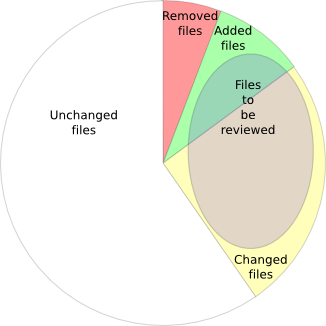
File types to be reviewed
How can I provide useful background information to reviewers?
You can add project-level notes on the project summary page, and file-level notes on the files administration page.
Note that you can include links in notes, to HTML pages, file:/// URLs, or to other files or Java classes within the review project. See links in notes and comments.
I'd set an original path, but it's been lost after regenerating diffs
When you regenerate diffs for a project, the diffs for individual files may well have changed - JCR can't know what's still valid, so it applies the following logic:
- Any original paths on review files are cleared, and the change type for each file reverts to the change type calculated from the diffs
- Any file comments are moved to line 1 of the file (note that this can only happen if you started reviewing the project, then reverted its status to Selecting Files, and regenerated the diffs).
When selecting files, viewing a file loses my changes
When you're selecting and annotating review files on the files administration page, clicking on a file to view its contents will produce a dialog stating that your changes will be lost if you continue.
The easy way here is to view the file in another browser tab page, while continuing to set up the files in the files administration page. If using Firefox, the easy way to do this is to click on the file link using the scroll wheel on the mouse (which doubles as a middle button).
Why isn't my <insert file type> file syntax highlighted correctly?
JCR uses the file extension to determine the type of file for syntax highlighting. So, if your extension doesn't tell the full story, the syntax highlighting will probably be wrong. For instance, if your documentation is in ReStructured Text, but the extensions are .txt, the files will be rendered as text.
Note that you can configure the syntax highlighting used for any given file extension - see the jcr.highlight-syntax.lexer configuration options.
Why is JCR slow at adding selected files for review from a remote Subversion repository?
JCR generates file statistics (number of lines, number of diff chunks, % change) at the time the file is attached to the review project. When the files are in a Subversion repository, pysvn makes a number of network calls for each file - this means that accessing a slow repository over a remote link can - how shall I put this - compromise performance a little. You may want to attach only a few files at a time.
Reviewing Projects
How can I hide all the removed code so I can see the important stuff?
On the file review page, used the 'Show deleted lines' link in the file header.
How can I link to another review file in a comment?
Sometimes you'd like to include a link to another review file in a comment, for example to point out where this bit of code was copy-and-pasted from :-(. You can insert links using the jcrfile:/// or jcrclass:// URL formats. See links in notes and comments.
How can I link to external URLs in a comment?
As well as links to other review files or classes, comments also renders external URLs as links. Supported URL types are http, https and file. See links in notes and comments.
How can I view any arbitrary file?
The 'View any file' page allows you to search for and view any file in your project that has been added, changed or deleted. However, it doesn't yet provide access to unchanged files.
If you want to view an unchanged file:
- If it's a Java class, any reference to that class in a Java review file will provide a link to view the class
- If it's a Java class, you can add a jcrclass:// URL to a comment, and this will render as a link to the file. For this, you only need to know the class name
- If it's not a Java class, you can add a jcrfile:// URL to a comment, and this will render as a link to the file. For this, you need to know the full path to the file from the file set root directory.
Why don't I see syntax highlighting on comment pages and dialogs?
In order to correctly interpret the syntax for a file, it has to be parsed right from the start. However, when JCR displays a fragment of the file as context for a comment, it doesn't parse the parts of the file it doesn't need to show. Providing syntax highlighting in these fragments would therefore slow down display.
I searched in the file review page, and the cursor disappeared
If you search in the file review page, and the file is scrolled down at least a bit, and the search text is found in the few lines above the top of the visible code, you won't see the cursor. This is a bug caused by the way the page header is shown. If you scroll up a few lines, the cursor will become visible.
Installation
I'm trying to use easy_install to install a database driver. What do I need to make it work?
For many people, the hardest part of getting JCR installed is to get a working database driver using easy_install. Not that it's really difficult - it's just that on most boxes this requires easy_install to compile some C code, and that's when you find out that you don't have all the dependencies...
So, first tip - if you can get a pre-built database driver with your distribution, do so - it's by far the easiest way. The drivers are as follows:
- Postgres: psycopg2. Ubuntu package is python-psycopg2
- Mysql: MySQL-python. Ubuntu package is python-mysqldb
- Sqlite: pysqlite. Ubuntu package is python-sqlite. Note that Windows binaries are available from google code.
If you can't get a pre-built driver, then you're going to need at least the following packages installed:
A C compiler (typically GCC) - CYGWIN NOTE: This is often missing on Cygwin installs!
Headers for the C library. Ubuntu package is libc6-dev
C headers for Python. Ubuntu package is python-dev
Your database client library and the associated C headers
- For Sqlite, the Ubuntu packages are sqlite3, libsqlite3-0, libsqlite3-dev
- For MySQL, the Ubuntu packages include libmysqlclient15-dev
If you still get errors, you'll need to work out what the missing dependency is. One useful way is to look for an error message about a missing file or library, then find out what OS package provides that file and install it
easy_install died with a message about a version conflict. What do I do?
If the installation terminates with an error message similar to Installed distribution FooPackage 0.7.5 conflicts with requirement FooPackage>=0.8.1, there is a version clash between the dependent libraries. The end of the message (FooPackage>=0.8.1) shows the version(s) of the package supported by JCR (or one of its dependencies), while the start of the message (FooPackage 0.7.5) shows the version currently installed.
If the required version is greater than the installed version, note the name of the library (FooPackage in the example above), and proceed as follows to upgrade the library and continue with the JCR installation:
# easy_install -U FooPackage
# easy_install -f . jcr
If the required version is less then the installed version, you'll have to do a downgrade. Pick a version number that matches the requirement (e.g. 0.8.1 in the example), and specify it exactly:
# easy_install FooPackage==0.8.1
# easy_install -f . jcr
Setup and Configuration
How do I add a script to help generate file sets or selection files?
See the documentation for external scripts.
Why does JCR show an IOError and refuse to start?
If the log file path specified in you config file is invalid (directory doesn't exist, not writeable etc.), JCR won't start (and nor will the setup-app command work). Instead, you'll get a big stack trace, whose last line looks something like:
IOError: [Errno 2] No such file or directory: '/a/b/c/jcr.log'
Fix the path in the args setting under [handler_file], and all will be well.
I'm reviewing very large files. Is there any way to make JCR faster?
Shame on you for writing large files in the first place ;}
The HTML page size for large files is considerable, so one way to reduce this (and the time required to render the page in the first place) is to turn off syntax highlighting. This should drop page display times by about one third (measured at the browser).
To do this, set jcr.highlight-syntax to False in the app:main section of the config file, and restart JCR.
Also, ensure that JCR is caching lines from review files (enabled by default - see the jcr.reviewfile-cache.enable setting). Once a review file has been viewed once, details of the lines (including syntax colouring and diffs) are cached in a file, and used for subsequent viewing.
Every time there's an error in the log, I get a message about connection refused
By default, JCR tries to send an email to the administrator whenever there's an error. This is controlled by the smtp_server and email_to properties in the DEFAULT section of the .ini file. The 'connection refused' message occurs because there's no SMTP server available on the host you've configured. Either correct the configuration or comment out the properties.
Browser Quirks
JCR is tested on Firefox (currently 3.0.x) and Internet Explorer (7). It also sees some use with Google Chrome, and is known to work reasonably well on Apple Safari. Of these, Firefox is definitely the best for JCR use.
Why is the code font so large in IE?
Sadly, that's the size that IE renders a monospace medium font. I'll try to fix it in future...
Why does IE only show the first line of each comment in the grey AJAX pop-up?
This is an IE CSS issue. Let's see what IE 8 brings to the table.
How well does JCR work with Google Chrome?
Quite well, all told. Chrome is very fast, so it makes a good choice for JCR. However, there are a few little quirks:
- The comment popup dialog (for project and file comments) doesn't get re-used, so you can't just leave it open ready for the next comment - you'll end up with lots of open dialogs
- The dirty flag on the comment popup dialog doesn't work (or doesn't work reliably), so you can close the dialog without being prompted to save your changes.
How well does JCR work with Safari?
Again, pretty well. The most annoying issue is that, as with Chrome, the comment popup dialog doesn't get re-used - you'll need to close it after each submission.